
Empowering your users to use your applications with an MCP
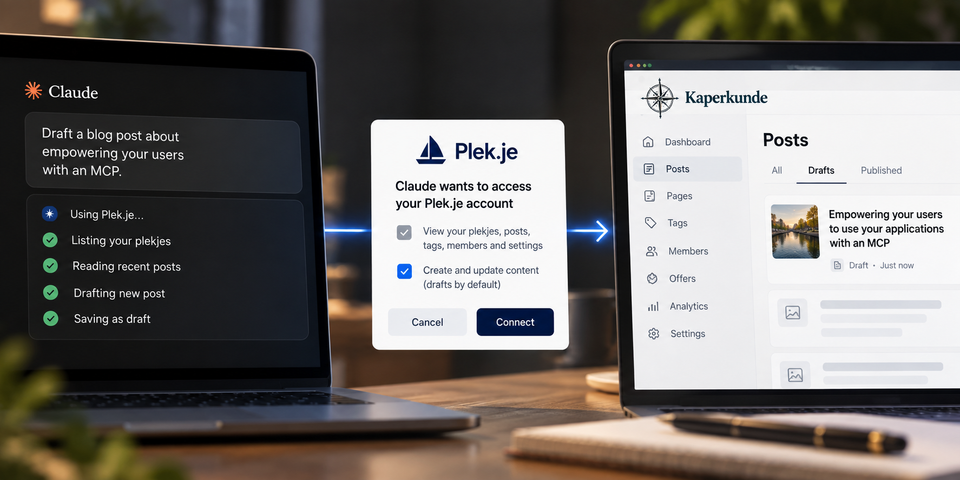
The short version: if your customers already work in an AI assistant, give them a remote MCP server: one URL they paste into Claude or ChatGPT, a sign-in, and a consent screen. After that the assistant can use your product for them, and your web UI is no longer the only way in. On 23 September 2026 we shipped one for Plek.je, our managed Ghost hosting. This post covers what we built and the decisions that mattered. The post itself was written through that connector.
How this post was made
I didn't write the first draft of this post in Ghost's editor. I typed one prompt into Claude Code, in a session that had the Plek.je repository checked out and the Kaperkunde Ghost connector attached. That connector was deployed the day before. This is the prompt, word for word:
Using the new kaperkunde ghost mcp I added, Draft a blog post about "Empowering your users to use your applications with an MCP" -- Using plek.je change as an example, note that this post was made with the context of my code and work from claude using the new MCP that was just deployed, show this specific prompt as an example in the post, and make sure it has the right meta data for SEO / GEO.
Claude took it from there. It read the commits and source files that make up the connector. Through the connector, it listed my sites, read this blog's settings and tags, and read my last post to match how I write. Then it saved this article as a draft with its slug, excerpt, meta title and description, social cards, tags and FAQ structured data already filled in. A draft is the connector's default, so a person still decides what gets published. I'll I had to do was review and post (This was the only sentence I had to hand write here)
That's the argument of this post: my code, my blog and my assistant are separate systems, and all three were used from one conversation. Your customers could work the same way with your product.
What an MCP server is, in one paragraph
The Model Context Protocol (MCP) is an open standard that lets an AI assistant call tools that a service publishes. A remote MCP server is one URL on your domain. The assistant connects to it, signs in the user with OAuth, and gets a list of tools with names, descriptions and input schemas, such as create_post, list_members and update_settings. From then on, "draft a post about X" or "who signed up this week?" become tool calls against your API, made as that user, within the permissions that user granted.
Why give your users one
- Your users are already in the assistant. For many of them the chat window is where the day starts. When your product is available there, they use it more, and they don't have to open another tab to do it.
- People can reach features they would never find in the menus. Every app has settings three menus deep that nobody finds. An assistant with the right tools finds them when someone asks.
- Tasks can span several products. This post needed a code repository and a CMS. Your customers have their own mix of tools, and your product becomes one of the pieces they can combine.
- It helps with GEO. Generative engine optimisation is about getting mentioned in AI answers. When an assistant is asked "which Ghost host works with Claude?", a documented MCP endpoint is a concrete fact it can cite. When we shipped, we couldn't find another managed Ghost host with a built-in connector.
The Plek.je example
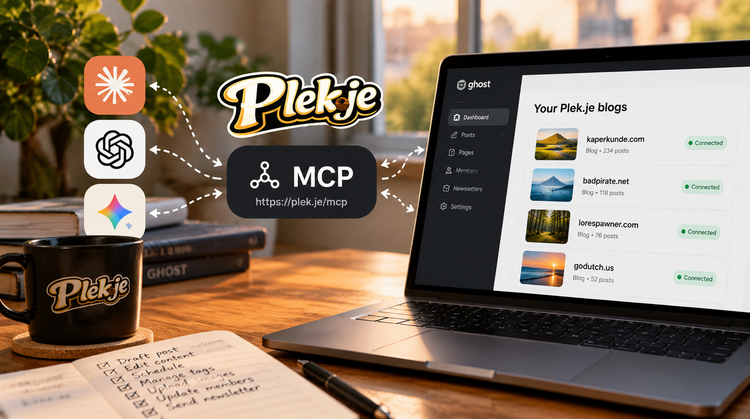
Plek.je hosts Ghost 6 sites, which we call "plekjes", on dedicated EU or US infrastructure. The connector is https://plek.je/mcp. For a customer, setup looks like this:
- In Claude, open Customize → Connectors and add a custom connector named Plek.je with that URL.
- Click Connect. A Plek.je window opens, and they sign in with a password or a magic link.
- A consent screen shows exactly what Claude is asking for. They can untick write access if they only want it to read.
- In a chat they ask things like "List my plekjes", "Draft a post about our autumn opening hours" or "Add a Members-only tag".
Custom connectors work on every Claude plan, including the free one. ChatGPT and any other client that can add a remote MCP server with sign-in use the same URL.
Six decisions that mattered
1. OAuth, not API keys
Asking customers to copy an admin API key into a chat app is bad for them, and it's a security incident waiting to happen. Our connector is its own OAuth 2.1 authorization server, built on Better Auth's mcp() plugin with jwt() and cimd(). Clients find it through the standard discovery documents at /.well-known/oauth-authorization-server and /.well-known/oauth-protected-resource/mcp. Claude identifies itself with a Client ID Metadata Document, and other clients register dynamically. If a request arrives without a token, the server answers 401 with a WWW-Authenticate header that points the client to those documents. The client then handles sign-in, and the customer never sees a key.
2. Two scopes, and step-up for changes
There are exactly two scopes: plekje:read and plekje:write. When a token without write access calls a tool that changes something, it doesn't get a vague tool error. It gets an HTTP 403 insufficient_scope challenge before the call runs. That lets the client ask the customer for more access at the point it's needed. A customer can start with read-only access and grant write access later, when they actually want the assistant to do something.
3. Tools are data
Each tool is a plain object: a name, a human title, a description written for the model, a Zod input schema, and a write flag. For example:
defineTool({
  name: "create_tag",
  title: "Create a tag",
  description: "Create a tag on a plekje.",
  write: true,
  inputSchema: z.object({ plekje: plekjeArg, ...tagFields }),
  handler: (args, ctx) =>
    guarded(async () => {
      const { body } = await callGhostAdmin({
        userId: ctx.userId,
        plekje: args.plekje,
        method: "POST",
        path: "tags/",
        body: { tags: [strip(args)] },
      })
      return jsonResult(body.tags?.[0] ?? body)
    }),
})
Everything else is derived from those objects. The set of tools that need plekje:write is computed from the write flag. So are the MCP annotations clients use to decide when to ask the user for confirmation: readOnlyHint, destructiveHint and idempotentHint. That means adding a tool doesn't require a separate permissions change that someone could forget.
4. Purpose-built tools, plus a fenced escape hatch
The common jobs get dedicated tools with tight schemas: posts, pages, tags, members, settings and image upload. Everything else in Ghost's Admin API goes through four generic tools, ghost_admin_read, _create, _update and _delete, which only accept paths on an allowlist. Snippets, webhooks, themes, newsletters, offers and tiers are on the list. Anything that could create more credentials or staff access is deliberately not: integrations, API keys, invites, roles, user tokens, owner transfer, whole-database export and sessions.
Dedicated tools make the everyday tasks reliable. The allowlisted generic tools mean the first unusual request doesn't turn into a feature ticket.
5. A named identity that can be revoked in two places
Ghost's integration keys can't reach settings or snippets. So inside each site the assistant acts as its own Administrator staff user, called "Plek.je assistant", using a staff token that our per-server API creates on first use and that the app stores encrypted. That gives the customer a clear audit trail, because every change shows who made it. They also have two ways to stop it: Account → Connected apps disconnects the assistant everywhere, and a site's Advanced settings removes its access to just that site. Every request checks that the customer's consent is still there, so a disconnect takes effect immediately rather than when a token expires.
6. Tell the model your house rules
An MCP server can send instructions to the assistant along with its tool list. Ours are three sentences long. Call list_plekjes first. Write bodies as HTML. New posts are drafts, and publishing with a newsletter also emails every subscriber, so only do that when the user asked for it. That last sentence costs nothing to write, and it keeps the assistant from emailing a customer's whole list by mistake.
Make it findable
If customers can't find the connector, they won't use it. Alongside the connector we shipped:
- A setup guide at plek.je/ai for Claude (web, desktop, mobile and Claude Code) and ChatGPT, with HowTo and FAQPage structured data generated from the same source as the visible steps, so the two can't drift apart.
- The MCP URL near the top of /llms.txt, the plain-text site map that AI crawlers read.
- A one-click Claude Desktop extension (
.mcpb) for people who'd rather not paste a URL. - A dismissible "Use your plekje with Claude" card in the dashboard that disappears once an assistant is connected.
A checklist for your own
- Use one remote URL on your own domain. Streamable HTTP, stateless if you can manage it.
- Use OAuth with standard discovery. Support Client ID Metadata Documents and dynamic client registration, and never ask for API keys.
- Keep the number of scopes small, and return
403 insufficient_scopeso clients can ask for more access when they need it. - Define tools as data. Derive permissions and read-only and destructive hints from the same definition.
- Build dedicated tools for the top tasks, and put any generic passthrough behind an allowlist.
- Give the assistant its own named, revocable identity, and check consent on every request.
- Use server instructions for the rules that protect your customers from surprises.
- Publish a setup guide with structured data, and list the endpoint in
llms.txt.
FAQ
What is an MCP server?
It's a service that publishes tools over the Model Context Protocol, an open standard, so that AI assistants such as Claude and ChatGPT can call them on a user's behalf. A remote MCP server is reached over HTTPS at a single URL and signs users in with OAuth.
Do users need an API key to connect?
No. With OAuth, the user pastes the server URL into their assistant, signs in to your product and approves a consent screen. The assistant never sees a password or a long-lived key.
Is it safe to let an AI assistant change customer data?
It can be, if you design for it: separate read and write scopes, a consent screen where write access can be declined, drafts as the default, an allowlist on generic endpoints, a dedicated identity for the assistant, and revocation that takes effect immediately.
Which assistants can use the Plek.je connector?
Claude on the web, desktop and mobile, and Claude Code, on any plan including Free. ChatGPT and any other app that can add a remote MCP server with sign-in can use it too. They all use the same address: https://plek.je/mcp.
Kevin Lohman runs Kaperkunde, an independent software consultancy in Amstelveen, and builds Plek.je. Twenty years of iOS and full-stack engineering at Apple, Meta, BlackBerry and Grindr. If you want an MCP server for your own product, email badpirate.


Member discussion