
SpArk: a family hub for the MeshCore mesh
Dit artikel in het Nederlands: SpArk: een familiehub voor het MeshCore-netwerk
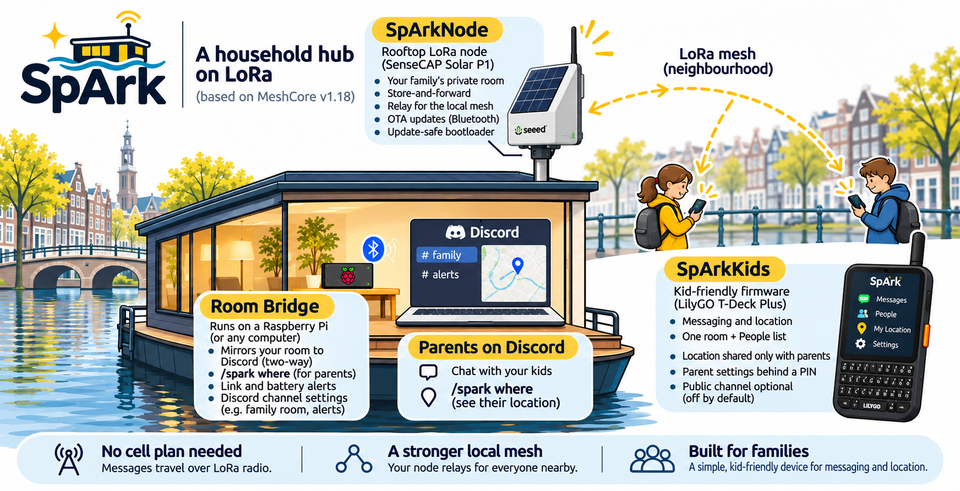
SpArk is a small open source project that turns a rooftop LoRa node into a hub for your household: a private room for your family, a relay for your neighbourhood, a Room Bridge to Discord, and a simple handset for kids.
It is based on MeshCore v1.18. I built it for my own family, on a houseboat in Amsterdam, and I'm releasing it so others can use it too.
Why you might want it
- Family comms without cell coverage or plans. Messages travel over LoRa radio. No SIM cards, no subscriptions.
- A stronger local mesh. Your node relays for everyone nearby, not just for you.
- A kid-friendly device. Messaging and location, and nothing else.
The three parts
SpArkNode
Firmware for a rooftop node. It does two jobs at once:
- It is a room for your own household or tribe, with store-and-forward, so messages wait for devices that were out of range or switched off.
- It is a relay that strengthens the local mesh for everyone.
Updates go over the air via Bluetooth, so you don't have to climb onto the roof with a cable. An OTA-safe bootloader means a failed or interrupted update can't leave a node stranded.
The recommended hardware is the Seeed SenseCAP Solar Node P1 or the P1-Pro. Other MeshCore-capable boards can work.
Room Bridge
A small program that runs on a Raspberry Pi, or any computer within Bluetooth range of the node. Its main job is your private room on the mesh: it mirrors the room to Discord both ways, so you can get and answer messages from mesh devices, like the kids' handsets, when you don't have your radio on you.
A read-only window on Public. A Discord channel can also show the local MeshCore Public channel, read-only: an observer's view, the same kind of view mc-radar gives.
/spark wherefor parents.- Notices when the link drops or the battery runs low.
- Settings per Discord channel, so one channel can show Public while another carries your family room.
- Discord today, and eventually other platforms.
SpArkKids
Firmware for the LilyGO T-Deck Plus. Think of it as a "dumb phone" with no service plan: messaging plus location, touch-first.
- One room, and a People list for private chats.
- Location is shared only with parents.
- Parent settings sit behind a PIN.
- The Public channel is optional, and off by default.
How to install
The code lives at github.com/kaperkunde/spark-core. The SpArk release is currently under review there as a set of stacked pull requests, so check the repository for the current state before you start.
1. Run the setup script
./setup.sh --dry-run
./setup.sh
Do the dry run first; it shows what would happen without changing anything.
The script asks:
- Which parts you want: SpArkNode, Room Bridge, SpArkKids, or any combination.
- The radio preset. The default is the Dutch one (869.618 MHz, 62.5 kHz, SF7, CR5, 2-byte path hashes, scope
nl). You can also pick EU, or enter your own, including a province scope such asnl-nh. - Names, passwords and PINs.
- Your Discord bot details and time zone.
It writes everything to a single .env file.
2. Build and flash
The script then builds what you chose and guides you through flashing.
- SpArkNode: double-tap the reset button. The node shows up as a drive and the script copies the UF2 file onto it.
- SpArkKids: put the T-Deck in download mode by holding the trackball while powering on. The script takes a full backup first, so you can always restore other firmware.
- Room Bridge: the script installs the bridge as a service, with systemd on a Pi or launchd on a Mac, so it starts by itself and stays running.
Dutch settings
Out of the box, SpArk uses the Dutch MeshCore preset: the setup script writes the radio settings (869.618 MHz, 62.5 kHz, SF7, CR5), 2-byte path hashes and the flood scope nl to .env, and a new node starts with those.
The rest of the community's recommended settings you set once on the node's console (USB, the MeshCore app's admin login, or /spark cli from Discord):
- Relaying on:
set repeat on - Duty cycle 10%:
set dutycycle 10 - A province scope, e.g.
nl-nh, with theregioncommands - No relaying of un-scoped floods:
region denyf * - Loop detection:
set loop.detect minimal - Adverts every 4 hours and flood adverts every 50 hours:
set advert.interval 240,set flood.advert.interval 50 - A name in the NL-<PROV>-<PLACE>-<name> format:
set name ...
My own node runs exactly this, as NL-NH-AMS-WoonSpArk with scope nl-nh.
Outside the Netherlands? Configure the radio and these settings for your own local rules and community.
Using it
On the kids' device:
- It joins the room automatically. There is nothing to configure.
- Tap a name in the People list to send a private message.
- Swipe right-to-left to go back.
- The gear icon has "Change my name" and the Parent settings.
For parents:
- Type
/spark wherein Discord and you get a Google Maps link to the device's last reported position. - Location is shared only with parents, and only on request.
Status and roadmap
It runs on my own roof and in my own kids' hands, and that is the extent of the testing so far. Expect rough edges.
Planned:
- A receive-only MQTT observer feed, so the node can contribute to mc-radar and the DutchMeshCore network.
- Hops, SNR and route shown with mirrored messages.
Feedback is very welcome. If you try SpArk, or get stuck trying, please open an issue on GitHub. I would especially like to hear from people on other hardware or in other regions.
This post was drafted with Claude's help. So was a lot of SpArk.


Member discussion