
Pitch: a football tactics board, built between two conference talks
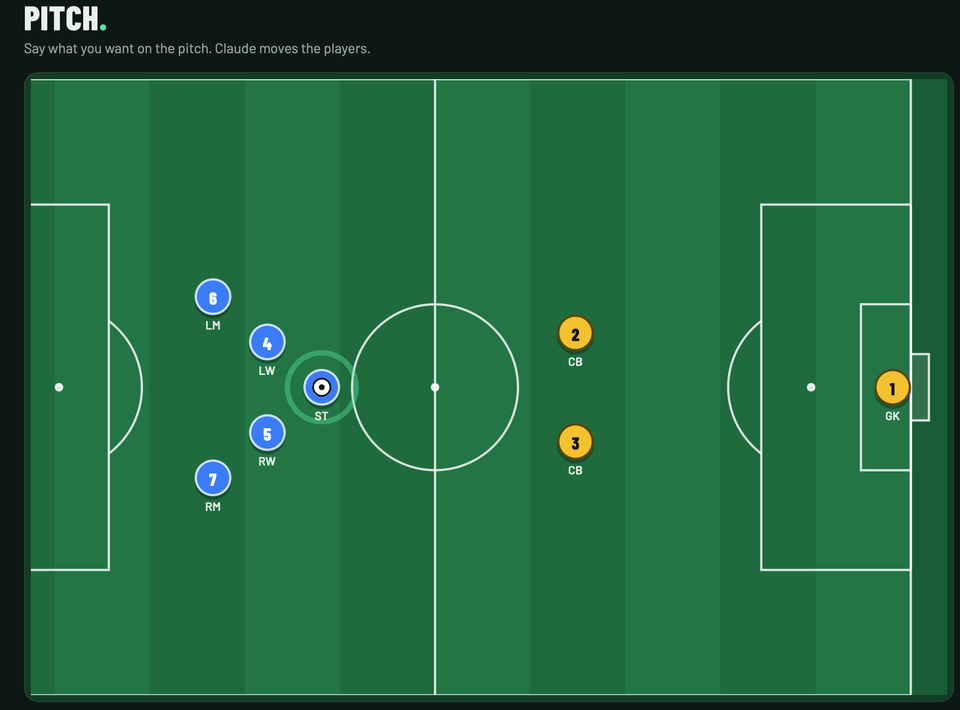
Earlier this week I was at an AI Builders conference. The icebreaker: form small groups and come up with AI-based ideas to pitch. One of the people in my group came up with a good one. A tactics board for football coaches: you say what you want, the players move on the pitch, and a coach can show a player what he means on an iPad in a few seconds.
Most icebreaker ideas stay on a sticky note. I opened Claude on my phone instead. While the next two presenters were on stage, it built the idea and put it live on its own domain, with me tapping approvals along the way. It took about three or four back-and-forths, almost a one-shot, and it was deployed before they were done, so I could show it off. We pitched an idea about a pitch, so the name picked itself.
Try it: pitch.kaperkun.de. Tap the mic (or type) and ask for something.
- "Show the last play from the Dutch national team that resulted in a goal." It searched the web, found the match and drew the move with the actual players' names.
- "Do the flying V from the end of The Mighty Ducks." A passable flying V, on a football pitch.
- "2 v 1: two attackers against one defender and the keeper." Only the four players involved, zoomed in, as a play you can loop.
- "Change it to a rec league in the Netherlands for age 11." The pitch shrinks to half size and both teams go to 8 v 8, the KNVB format for that age.
What I asked for
The brief, more or less as I said it into my phone: make me a website for our group's idea that shows a soccer field and takes voice prompts, use a large language model to work out where the players stand, so a coach can show a player what he means on an iPad in a few seconds. Cutting corners is fine, but the Anthropic integration has to work. Deploy it on my server.
Claude first threw together a quick version that ran inside claude.ai, so I had something to show within minutes. Then it built the real thing and deployed it to my own Coolify server through PCP: a new project, a build, two failed health checks it diagnosed and fixed itself (the wrong port, then IPv6), and a link to the live site. I added the API key myself. That was the first version.
The next few rounds were me playing with it and asking for more:
- Different formats. My first real test was a Dutch youth league for 11-year-olds, which it couldn't do, because I'd been given exactly 22 players. One round later the pitch size and team sizes follow whatever format you name.
- Plays, not just pictures. Keyframes you can loop, the ball moving between players, a zoom per frame, arrows for runs and passes. You can also build a play by hand: add a frame, drag players and the ball, play it back.
- Web search, so it can look up a team, a coach or a match instead of guessing.
- A real address. Claude handed the DNS work to a helper agent, which added a record for pitch.kaperkun.de at my domain registrar and set it as the site's domain. Another one drew the little "Made in 10 min" badge at the bottom, using the real icons from this site and pcp.gg.
All of it happened in the cloud. Claude wrote the code, pushed it, deployed it, changed DNS and checked the result, while I watched talks and approved things on my phone.
Why I could let it do all that
The interesting part isn't that an AI can write a football app. It's that I was comfortable handing it the keys to my server, my DNS and my API accounts while I wasn't looking at a screen. That's what PCP is for. Claude reaches my tools through PCP, and PCP decides what it may do:
- Every new kind of action asks me first. Fetching from a site it hadn't used before, adding a new API, a new tool: I got a link, tapped allow, and it carried on. Things I'd already allowed just ran.
- Secrets never pass through the chat. When the site needed a key, PCP moved it from one place to the other. Claude only ever saw that it had been set, never the key itself.
- Claude can propose new tools for itself. When the first search source blocked it, it tested other sources, then proposed two new read-only search APIs and a "Web search" tool combining them, each for me to approve. The site has used that ever since.
Without that, I'd have had to choose between babysitting every step and giving an AI my passwords. With it, I just get a tap on my phone now and then.
Keeping it running
After the conference I asked Claude to turn the demo into something that can stay up:
- It runs on my token service as a single shared user, with a $10 Anthropic grant that doesn't expire, so you can play with it without signing up. A play costs about two cents.
- Web search goes through PCP, combining recent news and Wikipedia, because my token service doesn't charge for Anthropic's own search tool (yet). Claude says which pages it looked at under every answer.
- The code is public: github.com/kaperkunde/pitch. It's one small Node server and one HTML page, with no dependencies.
It isn't perfect. Since the switch, search finds news headlines rather than match reports, so replays of real goals can be more "this is the pattern" than "this is exactly what happened", and Claude says so in its note when that's the case. The flying V is, as I said, passable. But for a group's icebreaker idea, built between two talks, I'll take it.
My advice
If you have ideas and you like making things online, you should be using Claude, and you should be using it now, while tokens are still this cheap. The gap between "I wonder if…" and a working thing on a real address is now a conference talk. What used to slow me down wasn't the code; it was the hundred small steps around it (servers, DNS, keys, deploys). With the right tools around the AI, those steps are a tap on your phone.
If you want to give your assistant that kind of reach without giving it your passwords, have a look at PCP. And if you missed it, A Morning with Claude and PCP shows the same setup on a very different job: signing up utilities for our houseboat, hands-free.


Member discussion